
How to Deposit in HQ177 Game
Depositing in HQ177 Game is a simple process when you follow the steps shown inside the app. For new users, the main thing is to choose the correct deposit option, select an available payment method, enter the required details, and check everything before confirming. The exact payment options can change with app updates, so always follow the latest instructions displayed on your HQ177 account.
This guide explains the HQ177 Game deposit process in simple English. It also covers common deposit problems and useful points that can help you complete the process without confusion.
What Is the HQ177 Game Deposit Process?
The deposit process means adding a balance to your HQ177 Game account so you can use the available game and entertainment features. The process normally starts from the account dashboard.
Before adding a balance, check the available payment methods shown on your screen. Different users may see different options depending on the current platform setup.
How to Deposit in HQ177 Game
Open Your HQ177 Game Account
First, open HQ177 Game on your device and enter your account dashboard. Make sure you are using the official application or website and that your internet connection is working properly.
Once the main dashboard loads, look for the Deposit, Recharge, or similar balance option.
Select the Add Credid Option
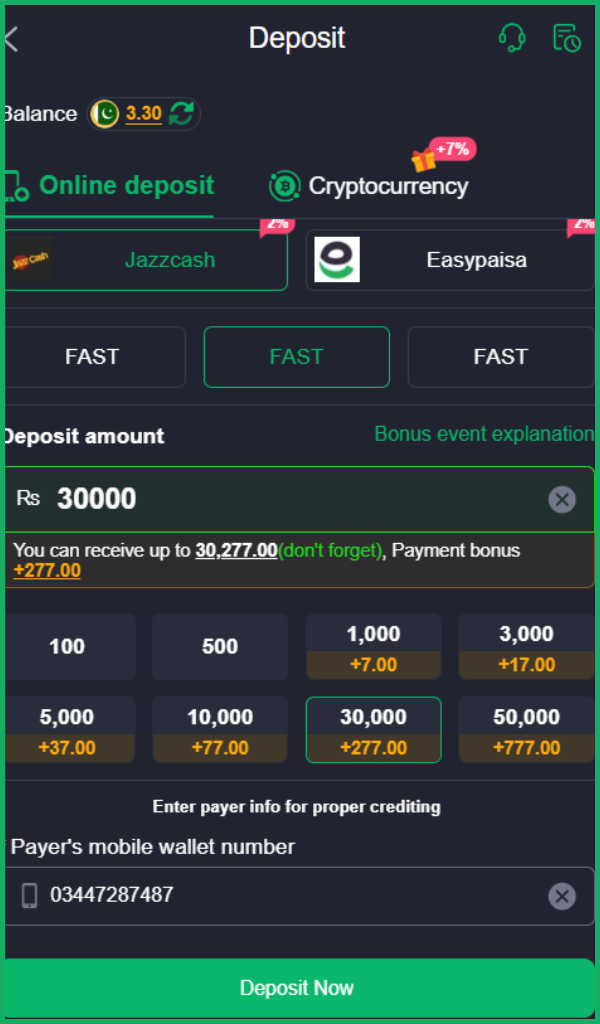
Tap the add fund option to open the payment page. You should then see the payment methods, which are JazzCash and EasyPaisa, currently supported by the platform.
Take a moment to read the available choices. Do not select a payment method simply because it looks familiar. Use the option that is currently available and suitable for your account.
Choose a Payment Method
HQ177 may display different payment channels like EasyPaisa or JazzCash. The available choices can depend on the current platform system.
When you select a method, the screen may show instructions about where and how to send the required amount. Follow those instructions exactly and do not use payment details found on random social media posts or unofficial pages.
Enter the Deposit Amount
After selecting the payment method, enter the amount you want to add according to the limits shown on the deposit screen.
Check the minimum and maximum limits before continuing. If the amount is outside the allowed range, the transaction may not be accepted.
It is also a good idea to start with an amount you are comfortable using for entertainment. Never deposit more than you can afford to lose.
Complete the Payment
Follow the payment instructions displayed by HQ177. Depending on the selected method, you may need to use a supported mobile payment service or another available channel.
After completing the payment, keep the transaction reference or receipt if one is provided. This can be useful if the balance does not appear after the transaction.
Check Your HQ177 Balance
Return to your HQ177 dashboard after completing the payment. Your balance may update after the platform confirms the transaction.
If the balance does not appear immediately, avoid sending another payment straight away. First, check the transaction status and wait for the normal processing period shown by the payment system.
Important Things to Check Before Recharge
A little checking can prevent many problems. Before confirming a transaction, look at these points:
- Check the payment account details carefully.
- Confirm the deposit amount before sending it.
- Use only payment details shown through the current platform process.
- Keep your transaction receipt or reference.
- Do not share your password or verification code.
- Check the current deposit limit displayed by HQ177.
These simple habits make the process safer and easier to manage.
What If the HQ177 Recharge Is Not Showing?
Sometimes a completed payment may not appear in the account immediately. This can happen because of network problems, payment processing delays, or a temporary issue with the platform.
First, check whether the payment was actually completed. Then look at your transaction history if that option is available.
If the transaction has been completed but the balance is still missing, contact the official HQ177 support channel and provide the transaction reference. Do not send your password or private security information to anyone claiming to provide support.
Why a Deposit Can Fail?
A deposit may fail for several simple reasons. The selected payment method could be temporarily unavailable, the amount might not match the allowed range, or the payment details may have been entered incorrectly.
A weak internet connection can also interrupt the process. Therefore, if something goes wrong, check the displayed error message first instead of repeatedly submitting the same transaction.
Use HQ177 Responsibly
HQ177 Game is intended for game and entertainment use. Before making a deposit, understand the platform rules and the payment conditions shown to you.
Set your own spending limit and stay within it. Never treat game activity as a source of guaranteed income, and do not deposit funds simply because you want to recover an earlier loss.
Final Words
The HQ177 Game adding fund process is straightforward when you carefully follow the instructions shown on the current payment page. Open the deposit section, select an available payment method, enter an allowed amount, complete the payment, and then check your account balance.
Most importantly, verify payment details before every transaction and keep your transaction reference safe. Since payment methods and platform options can change, the instructions displayed inside the current HQ177 system should always take priority over older guides.